1. One of the major problems that organisations face is to allocate fixed costs among different IT tasks. Fixed costs refer to costs that remain the same regardless of any change in the activity level.
Another complication regarding the assessment of costs of IT is that the cost of a system does not end when the system is installed.Maintaining, debugging, and improving the system can result in an accumulation of costs over many years.
2. Intangible benefits from IT are difficult to quantify. In such cases, it is most likely that an inputwill be requested about the intangible benefits that an information system provides for you.
3. NPV stands for net present value. NPV method is used to convert future values of benefits to their present value equivalent by “discounting” them at the organisation’s cost funds. The method works best when the costs and benefits are well defined enough to be converted into monetary values.
Return on Investment (ROI) measures management’s effectiveness in generating profits with its available assets. The ROI measure is a percentage, and the higher the percentage return,the better.
Business case approach refers to a written document that managers use tojustify funding one o more specific applications or projects. It describes what you do, how you do it, and how a new system could better support you. A business case also provides the bridge betweenthe initial plan and its execution.
4. Outsourcing services are provided by:
· Software companies such as IBM and Oracle, who offer services for developing, operating, and maintaining IT applications.
· IT outsourcers such as EDS
· Large CPA companies
· Management consultants
5. An application service provider (ASP) is an agent or a vendor who assembles the software needed by enterprises and packages the software with services such as development, operations, and maintenance. Next, the customer accesses these applications via the Internet or VANs through a standard Web browser interface.
The advantages of ASP include:
· save costs
· reduce software maintenance and upgrades
· reduce user training
· make the company more competitive by reducing time-to-time market and enhance the company’s ability to adapt to changing market conditions.
6. ASP also has some disadvantages:
· ASPs might not offer adequate security protection.
· Software might not be perfect fit for the desired application.
· Company must make certain that the speed of the Internet connection between the customer and the Asp is adequate to handle the requirements of the application.
7. The selection and management of vendors and software packages is a major aspect of developing an IT application. The steps are as follows:
Step 1: Identify Potential Vendors. Through various sources such as software catalogs, web searches, peers in other companies, lists provided by hardware vendors, and technical and trade journals, companies can identify potential software.
Step 2: Determine the Evaluation Criteria. A vital part in evaluating a vendor and a software package is to develop a well defined set of evaluation criteria.
Step 3: Evaluate Vendors and Packages. The goal of the evaluation is to determine the gaps between the company’s needs and the capabilities of the vendors and their application packages.
Step 4: Choose the Vendor and Package. Once the company has narrowed down the list of potential suppliers, it can begin negotiations with these vendors to determine how their packages might be modified to remove any discrepancies with the company’s IT needs.
Step 5: Negotiate a contract. The contract with the software vendor is vital and specifies both the price of the software and the type and amount of support that the vendor agrees to provide.
Step 6: Establish a Service Level Agreement. A service level agreement (SLA) is a formal agreement that specifies how work is to be divided between the company and its vendors.
8. A request for proposal (RFP) is a document that is sent to potential vendors inviting them to submit a proposal describing their software package and how it would meet the company’s needs.
Thursday

Week 11: Chapter 9 - Managerial Support Systems
1. The decision process proposed by Simon composed of three major phases: intelligence, design, and choice.
The intelligence phase involves managers examining a situation and identifying and defining the problem.
In the design phase, decision makers construct a model that simplifies the problem. The model is constructed by making assumptions that simplify reality and by expressing the relationships among all relevant variables.
The choice phase involves selecting a solution that is tested “on paper”.
2. Managers need IT support to make good decisions with valid and relevant information.
3. The decision matrix consists of nine cells that comprises of three primary classes of problem structure and three broad categories of the nature of decisions.Lower-level managers usually perform the structured and operational control-oriented tasks (cells 1, 2 and 4). The tasks in cells 3. 5,and 7 are usually the responsibility of middle managers and professional staff. The remaining cells 6, 8, and 9 refer to the tasks normally undertaken by senior executives.
4. Data mining involves searching for valuable business information in a large database, data warehouse, or data mart. It performs two basic functions: predicting trends and behaviours and identifying previously unknown patterns. Data mining addresses why it is happening and provides predictions of what will happen in the future.
5. A digital dashboard provides rapid access to timely information and direct access to management reports. It is very user friendly and is supported by graphics. Most importantly it allows managers to examine exception reports and drill-down reports.
The intelligence phase involves managers examining a situation and identifying and defining the problem.
In the design phase, decision makers construct a model that simplifies the problem. The model is constructed by making assumptions that simplify reality and by expressing the relationships among all relevant variables.
The choice phase involves selecting a solution that is tested “on paper”.
2. Managers need IT support to make good decisions with valid and relevant information.
3. The decision matrix consists of nine cells that comprises of three primary classes of problem structure and three broad categories of the nature of decisions.Lower-level managers usually perform the structured and operational control-oriented tasks (cells 1, 2 and 4). The tasks in cells 3. 5,and 7 are usually the responsibility of middle managers and professional staff. The remaining cells 6, 8, and 9 refer to the tasks normally undertaken by senior executives.
4. Data mining involves searching for valuable business information in a large database, data warehouse, or data mart. It performs two basic functions: predicting trends and behaviours and identifying previously unknown patterns. Data mining addresses why it is happening and provides predictions of what will happen in the future.
5. A digital dashboard provides rapid access to timely information and direct access to management reports. It is very user friendly and is supported by graphics. Most importantly it allows managers to examine exception reports and drill-down reports.
Monday
Week 10: Chapter 8 - Organisational Information Systems
Section 8.1 - Before You Go On…
1. What is a Transactional Processing and the role of TP systems. State the key objective of TP/TPSs.
A transaction processing system (TPS) monitors, collects, stores, and processes data generated from all business transactions. It provides input to the organisation’s database. It is also input to the functional information systems, decision support systems, customer relationship management, knowledge management, and e-commerce.
Section 8.2 - Before You Go On…
1. What is a functional area information system? List its major characteristics.
A functional area information system provides information mainly to lower and middle level managers in the functional areas.
The information provided is used planning, organizing, and controlling operations.
2. How does an FAIS support management by exception? How does it support on-demand reports?
Exception reports include merely informationthat falls outside certain threshold standards. In order to support management by exception, management must firstly create performance standards. Next, the company sets up systems to observe performance, compare actual performance to the standards, and identify predefined exceptions.
Ad-hoc reports, also known as on-demand reports, are out-of-the-routine reports requested for information that is needed at different times outside the times when routine reports are performed.
Section 8.3 - Before You Go On…
1. Define ERP and describe its functionalities.
Enterprise resource planning (ERP) systems incorporate the planning, management, and use of all of an organisation’s resources. Their main objectives are to securely integrate the functional areas of the organisation and to enable information to flow impeccably across the functional areas. ERP systems provide the information necessary to control the business procedures of the organisation.
2. List some drawbacks of ERP software.
As advantageous ERP is, it also has some drawbacks. First of all, EPR can be tremendously complex, expensive, and time consuming to enforce. Another drawback is the predefined nature of the business processes of the software, meaning businesses may need to change existing business processes to suit it. Finally, ERP must be bought as a whole software package, even if the organisation only needs a few modules.
Section 8.5 - Before You Go On…
1. Define a supply chain and supply chain management (SCM).
A supply chain is the flow of materials, information, money, and services from raw material suppliers, through factories and warehouses to the end consumers. It also involves he organisation and processes that create and deliver products, information and services to end customers.
The role of supply chain management (SCM) is to plan, organize, and optimize the supply chain’s activities. SCM uses information systems. Its goal is to reduce friction along the supply chain.
2. List the major components of supply chains.
The major components of supply chains are upstream, internal, and downstream. Upstream refers to the sourcing or procurement from external suppliers occurs. The internal component is where packaging, assembly, or manufacturing takes place. Downstream is where distribution takes place, commonly by external distributors.
3. What is the bullwhip effect?
The bullwhip effect refers to erratic shifts in orders up and down the supply chain.
Section 8.6 - Before You Go On…
1. Define EDI and list its major benefits and limitations
Electronic data interchange (EDI) is a communication standard that allows business partners to exchange routine documents, such as purchasing orders, electronically.
EDI can be quite advantageous as it minimizes data entry errors because a computer processes each entry. In addition, the length of the message can be shorter and the messages are secured. EDI also increases productivity, improves customer service, minimizes paper usage and storage, and reduces cycle time.
As beneficial as EDI can be, it also has some drawbacks. EDI can be initially a costly investment, it is inflexible, and it also requires a long start up period.
1. What is a Transactional Processing and the role of TP systems. State the key objective of TP/TPSs.
A transaction processing system (TPS) monitors, collects, stores, and processes data generated from all business transactions. It provides input to the organisation’s database. It is also input to the functional information systems, decision support systems, customer relationship management, knowledge management, and e-commerce.
Section 8.2 - Before You Go On…
1. What is a functional area information system? List its major characteristics.
A functional area information system provides information mainly to lower and middle level managers in the functional areas.
The information provided is used planning, organizing, and controlling operations.
2. How does an FAIS support management by exception? How does it support on-demand reports?
Exception reports include merely informationthat falls outside certain threshold standards. In order to support management by exception, management must firstly create performance standards. Next, the company sets up systems to observe performance, compare actual performance to the standards, and identify predefined exceptions.
Ad-hoc reports, also known as on-demand reports, are out-of-the-routine reports requested for information that is needed at different times outside the times when routine reports are performed.
Section 8.3 - Before You Go On…
1. Define ERP and describe its functionalities.
Enterprise resource planning (ERP) systems incorporate the planning, management, and use of all of an organisation’s resources. Their main objectives are to securely integrate the functional areas of the organisation and to enable information to flow impeccably across the functional areas. ERP systems provide the information necessary to control the business procedures of the organisation.
2. List some drawbacks of ERP software.
As advantageous ERP is, it also has some drawbacks. First of all, EPR can be tremendously complex, expensive, and time consuming to enforce. Another drawback is the predefined nature of the business processes of the software, meaning businesses may need to change existing business processes to suit it. Finally, ERP must be bought as a whole software package, even if the organisation only needs a few modules.
Section 8.5 - Before You Go On…
1. Define a supply chain and supply chain management (SCM).
A supply chain is the flow of materials, information, money, and services from raw material suppliers, through factories and warehouses to the end consumers. It also involves he organisation and processes that create and deliver products, information and services to end customers.
The role of supply chain management (SCM) is to plan, organize, and optimize the supply chain’s activities. SCM uses information systems. Its goal is to reduce friction along the supply chain.
2. List the major components of supply chains.
The major components of supply chains are upstream, internal, and downstream. Upstream refers to the sourcing or procurement from external suppliers occurs. The internal component is where packaging, assembly, or manufacturing takes place. Downstream is where distribution takes place, commonly by external distributors.
3. What is the bullwhip effect?
The bullwhip effect refers to erratic shifts in orders up and down the supply chain.
Section 8.6 - Before You Go On…
1. Define EDI and list its major benefits and limitations
Electronic data interchange (EDI) is a communication standard that allows business partners to exchange routine documents, such as purchasing orders, electronically.
EDI can be quite advantageous as it minimizes data entry errors because a computer processes each entry. In addition, the length of the message can be shorter and the messages are secured. EDI also increases productivity, improves customer service, minimizes paper usage and storage, and reduces cycle time.
As beneficial as EDI can be, it also has some drawbacks. EDI can be initially a costly investment, it is inflexible, and it also requires a long start up period.
Wednesday
Week 9: Chapter 4
Chapter 4: Data and Knowledge Management
1. There are several difficulties in managing data;
1. There are several difficulties in managing data;
- The amount of data builds up over time.
- Data may not be stored and managed properly.
- New data are unstructured, meaning their content cannot be truly represented in a computer record. Such as blogs, podcasts or RFID tags.
- Data decays over time. Eg. customers move to new addresses or new products are developed etc.
- Data security, quality and integrity can easily be jeopardised.
Data warehousing and databases can help manage data and resolve these issues.
2. The various sources for data are-
- Internal Data- eg. corporate databases
- External Data- eg. personal thoughts, opinions and experiences
- Personal Data- eg. commercial databases, government reports, and corporate websites.
Data can also come from the Web, in the form of Clickstream Data- those data that visitors and customers produce when they visit a web site and click on hyperlinks.
3. A primary key is the identifier field. It uniquely identifies that record so that it can be retrieved, updated and sorted in the database. The secondary keys are other fields that have some identifying information but typically doesn't identify the file with complete accuracy.
Further information on the keys: http://www.dynamicsoftware.com/knowledgebase/whataresoftwarekeys.html
4. An entity can be identified as an attribute of a person, place, thing, or event about which information is maintained in a record. A relationship is an association among two or more entities. Entities are shown as boxes and relationships as diamonds.
5. A relational database is based on the concept of two-dimensional tables - usually called a flat file - that contains all of the records and attributes. An advantage of this allows users to have great flexibility in the variety of queries they can make. However, a disadvantage of this is that a large-scale database can be composed of many interrelated tables, therefore the overall design can be complex and therefore have slow search and access.
6. Knowledge management (KM) is a process that helps organisations manipulate important knowledge that is part of the organisation's memory, usually in an unstructured format.
7. Tacit knowledge is the cumulative store of subjective or experiential learning. In contrast, explicit knowledge deals with more objective, rational and technical knowledge.
Tuesday
Week 8: Chapter 7
Chapter 7 Wireless, Mobile Computing, and Mobile Commerce
1. Wireless technologies include both wireless devices (smart phones) and wireless transmission media (microwave, satellite, and radio). These technologies have changed the way businesses operate and function in the modern world.
Wireless technologies have several applications to business-
Firstly, wireless technologies enable employees to communicate anytime and anywhere via wireless networks, providing organisations a strategic advantage by increasing productivity and speed and improving customer service.
Secondly, wireless technologies promote mobile commerce such as e-commerce transactions within the wireless environment.
2. Wireless transmission media/technologies, transmit signals without wires over the air or in space.
The various types of wireless media are:
Wireless fidelity (Wi-Fi) - is a set of standards for wireless local area networks based on the IEEE 802.11 standard.
Wireless wide-area networks (WWANs) - connect users to the Internet over geographically dispersed territory and operate over the licensed spectrum. These networkscan be placed into two categories: cellular radio and wireless broadband.
3rd Generation (3G) - of mobile telephony standards facilitate growth, increase bandwidth, and support more diverse applications. 3G networks enable network operators to offer users a wider range of more advanced services while achieving greater network capacity through improved spectral efficiency.
5. The drivers of mobile computing and mobile commerce are:
1. Wireless technologies include both wireless devices (smart phones) and wireless transmission media (microwave, satellite, and radio). These technologies have changed the way businesses operate and function in the modern world.
Wireless technologies have several applications to business-
Firstly, wireless technologies enable employees to communicate anytime and anywhere via wireless networks, providing organisations a strategic advantage by increasing productivity and speed and improving customer service.
Secondly, wireless technologies promote mobile commerce such as e-commerce transactions within the wireless environment.
2. Wireless transmission media/technologies, transmit signals without wires over the air or in space.
The various types of wireless media are:
- Microwave- microwave transmission systems are commonly used for high-volume, long distance, line-of-sight communication. They are susceptible to environmental interference and their towers cannot be more than 30miles apart.
- Satellite- satellite transmission systems utilize communication satellites.
At the moment, there are three types of satellites around the earth:
1. Geostationary (GEO),
2. Medium earth orbit (MEO), and
3. Low earth orbit (LEO).
Satellites must transmit and receive data via line-of-sight. However, since satellites cover a larger area of the earth, they overcome the limitations of microwave data relay stations. Satellites are also high enough for broadcast transmission. - Infrared- is red light that is not normally visible to the human eye. It is commonly used in remote control units for televisions, VCRs, DVDs and CD players as well as mobile phones for file-share. Infrared transmission is used for short-distance connections between computers and peripheral equipment.
- Radio- radio transmission uses radio-wave frequencies to send data directly between transmitters and receivers. It is inexpensive and easy to install and can transmit data at high speeds.
3. What is bluetooth? Bluetooth is an industry specification used to create small personal area networks. How is it used? Bluetooth can link up to 8 devices within a 10 metre area using low-power, radio-based communication. Bluetooth is used for common applications such as wireless handsets and filesharing for mobile phones and portable music players.
Wireless fidelity (Wi-Fi) - is a set of standards for wireless local area networks based on the IEEE 802.11 standard.
Wireless wide-area networks (WWANs) - connect users to the Internet over geographically dispersed territory and operate over the licensed spectrum. These networkscan be placed into two categories: cellular radio and wireless broadband.
3rd Generation (3G) - of mobile telephony standards facilitate growth, increase bandwidth, and support more diverse applications. 3G networks enable network operators to offer users a wider range of more advanced services while achieving greater network capacity through improved spectral efficiency.
5. The drivers of mobile computing and mobile commerce are:
- Widespread availability of mobile devices
- No need for PC- users can now access the Internet via a smart phone or other wireless device.
- The “cell phone culture”- the widespread use of cell phone.
- Declining prices- the price of wireless devices is declining.
- Bandwidth improvement- Wi-Fi, 3G cellular technology, and WiMax provide the necessary bandwidth for transmitting text, voice, video, and multimedia.
Monday
Week 6: Tech Guide 4 & Week 7: Chapter 5 & 6
Tech Guide 4: Basics of Telecommunications and Networks
1. A basic telecommunication system consists of three elements:
1. Web 2.0 refers to the live web. Information technologies and applications used by Web 2.0 include blogs, tagging, wikis and podcasting.
Web 2.0 websites typically include some of the following features/techniques-

2. Web services are applications, provided via the Internet, that users can select and combine through almost any device whether it be a computer or mobile phone. The function of web services is to permit different systems to communicate with one another without the aid of humans to translate the conversations.
3. Social Networking behind business is revolutionary - it allows businesses to communicate with their employees and consumers. Social sites like Facebook, Twitter, MySpace and LinkedIn feed the craving people have to find one another, exchange information, catch up and solve problems.
People into social networking use the word "viral" to describe how quickly networks form and spread.
Chapter 6: E-Business and E-Commerce
Section 6.1
1. Electronic commerce (or e-commerce) refers to the process of selling, buying, transferring and exchanging products, services or information through computer networks, including the Internet.
In addition to what e-commerce involves, e-business also entails customer service, online relationships with business partners and performing electronic transactions.
2. - Business-to-consumer (B2C): the organisations are the sellers and the individuals are the buyers.
- Business-to-business (B2B): both the seller and the buyer are business organisations
- Consumer-to-consumer (C2C): both the seller and the buyer are individuals
- Business-to-Employee (B2E): the organisation provides information and services to its employees.
3. Benefits of E-commerce:
1. Spamming Permission Marketing, Viral Marketing:
Spamming: is the abuse of sending unsolicited bulk emails that are unwanted to receivers.
 Permission marketing : allows consumers to voluntarily receive emails and advertising online.
Viral marketing: is the effort of 'word-of-mouth' messages sent through online to achieve marketing purposes.
Sources: http://books.google.com.au/books?id=UHA5Je0pZ9EC&pg=PA145&dq=spamming#v=onepage&q=spamming&f=false
Section 6.4
1. Micropayments are transferring very small amounts of money, often in conjunction with the threshold pledge system, in situations where collecting such small amounts of money with the usual payment systems is impractical, or very expensive, in terms of the amount of money being collected.
2. Multichanneling is a process which a company intergrates its offline and online channels.
Section 6.5
1. There are many ethical issues related to e-commerce.
E-commerce presents some threats to privacy (e.g. tracking) and job loss.
2. The major legal issues in EC are fraud on the Internet, domain names, cybersquatting, taxes and other fees, and copyright.
1. A basic telecommunication system consists of three elements:
- a transmitter that takes information and converts it to a signal;
- a transmission medium that carries the signal; and,
- a receiver that receives the signal and converts it back into usable information.
2. Ethernet is a common local area network protocol, ethernet uses twisted-pair wire or coaxial cable.
- Twisted-pair wire is the most common form of communications wiring and is used for almost all business telephone wiring. It is advantageous because it is inexpensive, widely available and easy to work with. However, it does hold some setbacks such as low bandwidth making it slow, it can be easily tapped and it is subject to interference.
- Coaxial cable is made of insulated copper wire and is much less susceptible to electrical interference in comparison to twisted-pair wire. It has a higher bandwidth than twisted-pair wire. Coaxial cable can be disadvantageous because it is difficult to work with and is relatively expensive and inflexible.
In contrast, fiber-optic cables are thousands of extremely fine filaments of glass fibers. It has a very high bandwidth, is relatively inexpensive and difficult to tap. The only problem with fiber optic cables is that it is difficult to work with.
3. The main reason for using networks are that it allows organisations to be prepared and flexible to the fluid business conditions. Networks also allow organisations to share hardware, computer applications, and data/information across the organisation. Networks are also imperative in businesses as it allows employees to share a close working-relationship even if they are far apart. Networks are especially an important connection between businesses and their customers.
4. A local area network (LAN) - links two or more devices in a restricted geographical region, so that all the devices in the network can communicate with one another. For example, an organisation’s Intranet.
A wide-area network (WAN) - are networks that cover a large area and normally connect several LANs. An example of WAN could be a company that is domestically covered, such as Telstra.
5. A network protocol are the rules and procedures that control and administrate transmission of data across a network.
6. Transmission Control Protocol/Internet Protocol (TCP/IP) is the protocol used in the internet.
The TCP has three basic functions, it:
- Manages the movement of packets between computers by creating a connection between the computers,
- Orders the transfer of packets, and
- Acknowledges that the packets have been transferred.
1. Web 2.0 refers to the live web. Information technologies and applications used by Web 2.0 include blogs, tagging, wikis and podcasting.
Web 2.0 websites typically include some of the following features/techniques-
- Search- The ease of finding information through keyword search.
- Links- Ad-hoc guides to other relevant information.
- Authoring- The ability to create constantly updating content over a platform that is shifted from being the creation of a few to being constantly updated, interlinked work. In wikis, the content is iterative in the sense that users undo and redo each other's work. In blogs, content is cumulative in that posts and comments of individuals are accumulated over time.
- Tags - Categorization of content by creating tags: simple, one-word user-determined descriptions to facilitate searching and avoid rigid, pre-made categories.
- Extensions- Powerful algorithms that leverage the Web as an application platform as well as a document server.
- Signals- The use of RSS technology to rapidly notify users of content changes.
2. Web services are applications, provided via the Internet, that users can select and combine through almost any device whether it be a computer or mobile phone. The function of web services is to permit different systems to communicate with one another without the aid of humans to translate the conversations.
3. Social Networking behind business is revolutionary - it allows businesses to communicate with their employees and consumers. Social sites like Facebook, Twitter, MySpace and LinkedIn feed the craving people have to find one another, exchange information, catch up and solve problems.
People into social networking use the word "viral" to describe how quickly networks form and spread.
Chapter 6: E-Business and E-Commerce
Section 6.1
1. Electronic commerce (or e-commerce) refers to the process of selling, buying, transferring and exchanging products, services or information through computer networks, including the Internet.
In addition to what e-commerce involves, e-business also entails customer service, online relationships with business partners and performing electronic transactions.
2. - Business-to-consumer (B2C): the organisations are the sellers and the individuals are the buyers.
- Business-to-business (B2B): both the seller and the buyer are business organisations
- Consumer-to-consumer (C2C): both the seller and the buyer are individuals
- Business-to-Employee (B2E): the organisation provides information and services to its employees.
3. Benefits of E-commerce:
- Benefits to organizations that use this with their business partners:
- direct marketing,
- selling,
- customer services, (call centres)
- fulfillment,
- procurement,
- replenishment and
- information management. - Benefits to consumers
- Benefits to society
- Increase sales
- Decreasing costs
- Provide price quotes
- Increase profits
- Expands the size of the market from regional to national or national to international
- Reach a narrow market
- Target market segmentation allows you to focus on a more
Limitations:
> Technical Limitations:
- costs of a technological solution
- some protocols are not standardized around the world
- reliability for certain processes
- insufficient telecommunications bandwidth
- software tools are not fixed but constantly evolving (ie. Netscape 3,4,4.7,4.75 etc.)
- integrating digital and non-digital sales and production information
- access limitations of dial-up, cable, ISDN, wireless
- some vendors require certain software to show features on their pages, which is not common in the
- standard browser used by the majority
- Difficulty in integrating e-Commerce infrastructure with current organizational IT systems
> Non-Technical Limitations:
- privacy issues
- customer expectations unmet
- rules and regulations (ie. Jan 2004 Bill C6 - new privacy law)
- security and privacy
- vulnerability to fraud and other crimes
- lack of trust and user resistance
- fear of payment information being unsecure
- tactile limitations
- legal issues outstanding such as jurisdiction
- legal environment has many new and conflicting laws
- cultural obstacles
- linguistic challenges
- limitations of support services
- financial cost
- sourcing tech support in foreign languages
- lack of critical mass in certain market areas for sellers and buyers
- accessibility outside of urban/suburban and areas effects universality
- higher employee training required to be click and mortar
- people's resistance to change
- people not used to faceless / paperless / non-physical transactions
1. Spamming Permission Marketing, Viral Marketing:
Spamming: is the abuse of sending unsolicited bulk emails that are unwanted to receivers.
Permission marketing : allows consumers to voluntarily receive emails and advertising online. Viral marketing: is the effort of 'word-of-mouth' messages sent through online to achieve marketing purposes.
Sources: http://books.google.com.au/books?id=UHA5Je0pZ9EC&pg=PA145&dq=spamming#v=onepage&q=spamming&f=false
Section 6.4
1. Micropayments are transferring very small amounts of money, often in conjunction with the threshold pledge system, in situations where collecting such small amounts of money with the usual payment systems is impractical, or very expensive, in terms of the amount of money being collected.
2. Multichanneling is a process which a company intergrates its offline and online channels.
Section 6.5
1. There are many ethical issues related to e-commerce.
E-commerce presents some threats to privacy (e.g. tracking) and job loss.
2. The major legal issues in EC are fraud on the Internet, domain names, cybersquatting, taxes and other fees, and copyright.
Sunday
Week 5: Ethics, Privacy and Information Security
Chapter 3: Ethics, Privacy and Information Security
1. Privacy- involve collecting, storing, and distributing details about individuals.
Accuracy- are issues that involve the authenticity, fidelity, and accuracy of the data that is collected and processed.
Property- are issues that involve the ownership and value of information.
Accessibility- are issues concerned with participants that should have access to information and whether they should have to pay for access.
2. Four types of I.T. attacks-
- Unintentional Attacks are gestures or acts that have no malevolent intent.
There are three main types of unintentional acts:
1. Human errors - include data entry errors, lack of training and IT skills, and theft of confidential material.
2. Variations in the quality of service by service providers - refer to situations where the delivery of a service or product to an organisation is not as expected
3. Environmental hazards - include dust, humidity, pollution and static electricity errors. They are detrimental to the secure and safe operation of computing equipment. - Natural Disasters - refer to acts of God such as floods, earthquakes, hurricanes, lightning and fire. Disasters like these can lead to severe loss of data and systems. In order to ensure that companies are well prepared should a natural disaster occur, companies should devise a plan for backup and recovery of data and information systems.
- Technical Failures - refer to problems with software and hardware.
- A common technical failre is a hardisk drive crash. - Management Failures - the lack of effort and interest in information security
A majority of information security breaches are explained by deliberate acts by organisational employees. Deliberate acts are intentional and malicious acts or gestures. Some of these acts include software attacks, theft of information of equipment or information, information extortion and cyber terrorism.
3. Three types of sofware attacks -
- Virus - most common.
A computer virus is a computer program that can copy itself, attach itself to another computer program and infect a computer without permission and/or knowledge of the user. A virus can lead to the exploitation of the security of information systems and corrupt data. - Trojan - are software programs that conceal themselves in other programs and only reveal their designed behaviour when they are activated. Malicious Trojan horse programs are used to evade protection systems in effect creating a vulnerable system to allow unauthorized access to a user's computer.
- Worm - A worm is a self-replicating computer program that performs malicious activities and spreads without the aid of another computer program. Worms almost always cause harm to the network.
Another software attack is a worm. A worm is a self-replicating computer program that performs malicious activities and spreads without the aid of another computer program. Worms almost always cause harm to the network.
4. The four major types of security controls in relation to protecting information systems-
- Physical controls avert unauthorised individuals from accessing a company’s facilities. A door and wall are examples of physical controls.
- Access controls confine unauthorised individuals from using information sources. Companies and individuals may use passwords, ID cards and biometrics as forms of access controls.
- Communication controls govern and secure the movement of data/information between networks. Communication controls include firewalls and anti-malware systems.
- Application controls security measures that protect certain applications.
5.Recent Software Threat: BOTNET
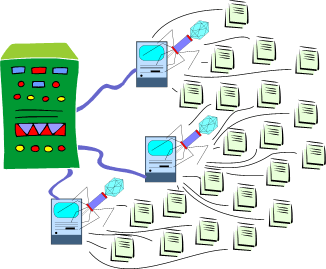
A botnet (also known as a zombie army) is a number of Internet computers that, although their owners are unaware of it, have been set up to forward transmissions (including spam or viruses) to other computers on the Internet. A bot is often created through an Internet port that has been left open and through which a small Trojan horse program can be left for future activation.
Resolutions: to prevent botnets to begin with, provide effective firewalls and other safeguards such as,
- Spyware
- CounterSpy software
There is also a program, BotSniffer, a prototype system designed to detect and disable botnets. Using traffic analysis the BotSniffer tries to identify botnet members by looking for command and control channels. Apparently the BotSniffer detector has been built as an independent plug-in for the popular open source intrusion detection system.
6. Authentication refers to the identity of the person requiring access to information systems and data.
Whereas, Authorisation decides which actions, rights and privileges an individual has on the basis of verified identity.
Both authentication and authorisation are vital to e-commerce as they determine the security of information systems and data. An example to e-commerce is internet banking, when doing banking online, individuals are required to have a client number and password in order to have access to their banking details.

Week 4: Technology Guide 2
Technology Guide 2: Computer Software
1. Software consists of computer programs that control the functions of computer hardware. There are two main types of software:
1. Software consists of computer programs that control the functions of computer hardware. There are two main types of software:
- Systems software
- Application software
Systems software manages the hardware resources of the computer software; it functions between the hardware and the application software. Examples of systems software include system control programs and system support programs. In comparison, application software allows users to perform specific tasks and information processing activities.
2. The two main types of systems software are:
- System control programs - they control use of the hardware, software and data resources of a computer system.
- System support programs - support the operations, management and users of a computer system by providing a variety of support services.
3. Application software that addresses a company’s particular or unique business need is known as proprietary application software. However, open source software is software whose source code is available at no cost to developers or users. When choosing either one of these softwares, businesses need to take into consideration the advantages and disadvantages each software poses and which one is best suited for the situation of use.
4. Software licensing is one of the legal issues that organisations face. The copyright of software is illegal. Software vendors have their software copyrighted to protect it from being copied. Therefore, businesses must license vendor-developed software to use it.
5.

- Solaris is a UNIX-based operating system introduced by Sun Microsystems in 1992 as the successor to SunOS.
- Source mode is mixed opem/closed source
- It's latest stable release was 5 months ago
- Supported programs - SPARC
- Default user interface - Java Deskop System or CDE
- Solaris' source code (with a few exceptions) has been released under the Common Development and Distribution License (CDDL) via the Open Solaris project
FEATURES:
- Solaris Operating System uses UFS as its primary file system.
- Solaris can be installed from physical media or a network for use on a desktop or server.
- Solaris can be interactively installed from a text console on platforms without a video display and mouse. This may be selected for servers, in a rack, in a remote data center, from a terminal server or even dial up modem.
- Solaris can be interactively installed from a graphical console. This may be selected for personal workstations or laptops, in a local area, where a console may normally be used.
- Solaris can be automatically installed over a network. System administrators can customize installations with scripts and configuration files, including configuration and automatic installation of third-party software, without purchasing additional software management utilities.
- When Solaris is installed, the operating system will reside on the same system where the installation occurred. Applications may be individually installed on the local system, or can be mounted via the network from a remote system.
Additional information (SUN- Solaris): http://www.sun.com/software/solaris/
Monday
Week 3: Technology Guide 1
Technology Guide 1: Computer Hardware
1. Computer hardware refers to the physical equipment used for the input, processing, output, and storage activities of a computer system. The major hardware components are:
1. Computer hardware refers to the physical equipment used for the input, processing, output, and storage activities of a computer system. The major hardware components are:
- Central processing unit - manipulates all data and control tasks performed by other components.
- Primary storage - internal CPU: temporarily stores data until it is processed.
- Secondary storage - external CPU: long term storage to store data for future usage.
- Output technologies - convert data and instructions in a form people can understand.
- Communication technologies - provides flow of information from external computer networks, Internet-to-CPU and the CPU-to-Internet
- 2. Moore’s Law predicted that microprocessor complexity would double approximately every two years.
3. A Microprocessor is the Central Processing Unit (CPU), made up of millions of transistors embedded in a circuit on a silicon wafer or chip. It performs the calculations; the registers, which store minute amounts of data and instructions immediately before and after processing; and the control unit, which controls the flow of information on the microprocessor chip.
4. The factors that determine the Microprocessors speed are: - The bus width
- Clock speed
- Word length and;
- Number transistors on the chip
- Machine instruction
- Binary form
 Input technologies - accepts the data and instructions and encrypts to a form the computer understands.
 5. The four main types of Primary Storage are:
- Registers
- Random access memory (RAM)
- Cache memory and;
- Read-only memory (ROM).
6. Secondary storage include-
- Magnetic media (tapes, hard drives, and thumb, or flash, drives) and,
- Optical media (CD-ROM, DVD, and optical jukeboxes).
7. Primary storage has much less capacity than secondary storage, and it is much faster and more expensive per byte second. It is located much closer to the CPU than is secondary storage. Therefore, secondary storage carries unlimited data and has more speed.
8. An enterprise storage system is an independent, external system with intelligence that includes two or more storage devices.
There are three types of enterprise storage devices:
1. Redundant Arrays of independent Disks (RAID)
2. Storage Area Network (SAN)
3. Network Attached Storage (NAS)
9. Human data entry devices require a certain amount of human effort to input data. Examples include, keyboard, mouse and touch screen. Source data automation devices input data with minimal human intervention.

Source data offers the following:
- Speed up data collection
- Reduction of errors, and
- Gather data at the source of a transaction or other event.
10. A new technology that has changed the way we do things is Java. Java allows businesses to develop programs quicker, write less and better codes and easily accessible. It is an advanced form of coding that html and is appealing to customers on certain business websites and may involve flash videos etc.

Java's benefits are:
Get started quickly: Although the Java programming language is a powerful object-oriented language, it's easy to learn, especially for programmers already familiar with C or C++.
- Write less code: Comparisons of program metrics (class counts, method counts, and so on) suggest that a program written in the Java programming language can be four times smaller than the same program written in C++.
- Write better code: The Java programming language encourages good coding practices, and automatic garbage collection helps you avoid memory leaks. Its object orientation, its JavaBeansTM component architecture, and its wide-ranging, easily extendible API let you reuse existing, tested code and introduce fewer bugs.
- Develop programs more quickly: The Java programming language is simpler than C++, and as such, your development time could be up to twice as fast when writing in it. Your programs will also require fewer lines of code.
- Avoid platform dependencies: You can keep your program portable by avoiding the use of libraries written in other languages.
- Write once, run anywhere: Because applications written in the Java programming language are compiled into machine-independent bytecodes, they run consistently on any Java platform.
- Distribute software more easily: With Java Web Start software, users will be able to launch your applications with a single click of the mouse. An automatic version check at startup ensures that users are always up to date with the latest version of your software. If an update is available, the Java Web Start software will automatically update their installation.
Week 2: Chapter 1 & 2
Chapter 1: The Modern Organisation in the Global, Web-Based Environment
1. The characteristics of a modern business environment:
- Global
- Enormously interconnected
- Competitive
- Real-time
- Availibility is perpetual
- Rapidly changing
- Information intensive
- Uploading
- Outsourcing
- Offshoring
- Supply Chaining
- Insourcing
- Informing
- The steroids (IM, VOIP, File Sharing, Wireless Technology etc.)
2. The global, web-based platform consists of hardware and software that include the internet and functionality of the World Wide Web - it allows individuals to connect, compute, communicate, collaborate and compete everywhere and anywhere, anytime with 24/7/365 Real-time. It provides access to limitless amounts of information, services and entertainment; in order to exchange knowledge and produce and sell goods and services. Overall, the platform encourages globalisation and a break-down of barriers.
3. There are three main pressures that characterise the global business environment:
- Market Pressures - global economy and strong competition, the changing nature of the workforce and powerful consumers.
- Technology Pressures - technological innovation and obsolescence and information overload.
- Societal, Political, Legal Pressures - social responsibility, compliance with government regulations and deregulation, protection against terrorist attacks and ethical issues.
And the following issues that fall under these three pressures-
- Global Market – increased competition and can source products from anywhere
- New Workforce –new skills, new locations, new hours
- Consumers are more powerful - consumers can track orders, research informations, compare businesses etc.
- Products and Services have high Obsolescence – technology is always changing, more advanced machinery and the increase of obsolete products is unpreventable
- Information Overload – the concept of digital obesity and large amounts of data can be stored
- Social Pressures – the digital divide
- Terrorism - terrorists can access, hack into information
- Social Responsibility
- Compliance with Government Regulations and deregulation
- Ethical issues
4. Organisations are responding to these pressures through the implementation of IT, such as-
- Stategic Systems - enable organisations to in crease their market share and/or profits, to negotiate with suppiers or to prevent competitors from entering the market.
- Customer Focus - organisations that attempt to provide excellent customer service and orientation to attract new or maintain existing customers.
- Make-to-order and Mass Customisation - Make-to-order is a strategy of producing customised products and services. Mass Customisation is the production of large quantities of items but customised to fit the desires of each customer.
- and E-Business or E-commerce is the operation of business activities electronically or online.
5. Information Technology Architecture is a high-level map of the information assets in an organisation. The Information Technology Architecture incorporates the requirements of the overall organisation and all individual users, the IT infrastructure and applications.
6. The internet is a platform, thus it is an architecture, infrastructure and an application program.
Chapter 2: Information Systems: Concepts and Management
1. An Application Program is a computer based program designed to support a particular task or business process. Such examples of an application program is Microsoft Word - a task for processing information and written documents or Microsoft Excel - a database to organise data into tables, pivots, charts etc.
Whereas, a Computer-Based Information System (CBIS) is an information system that uses computer technology to perform some or all of its intended tasks.
CBIS comprises systems such as:
- Hardware - processor, monitor, keyboard and printer. (accept data information, process them and display them)
- Software - program or collection of programs that enable the hardware to process the data
- Database- a collection of related or tables containing data.
- Network – a connecting system (wireline or wireless) that permits different computers or share resources.
- Procedures –are the set of components in order to process information and generate about how to combine the above
- People - are those individuals who use the hardware and software, interface with it, or use its output.
2. Strategic Information Systems (SISs) give organisations a competitive advantage as it implements the organisation’s strategic goals and increase its performance and productivity.
3. According to Porter's five forces, there are forces that could endanger a firm’s position in its industry or marketplace, these are -
- The threat of new entrants
- The bargaining power of suppliers
- The bargaining power of customers
- The threat of substitute products or services and,
- The rivalry among existing firms in the industry.
4. With reference to Porter’s chain model, Primary Activities are those business activities that relate to the production and distribution of the firm’s products and services, thus creating value for which customers are willing to pay, and Support Activities contribute to the firm’s competitive advantage by supporting the primary activities.
Primary Activities are:
- Inbound logistics (inputs)
- Operations (manufacturing and testing)
- Outbound logistics (storage and distribution)
- Marketing and sales
- Services
Support Activities do not add value to the firms’ products or services, but contributes to the firms competitive advantage by supporting the primary activities.
Support Activities are: - The firms infrastructure (accounting, finance, and management)
- Human resources management
- Product and technology development (R&D)
- Procurement
5. Information Technology make managers more productive and increases the number of employees who can report to a single manager, this means that there can be fewer managerial levels, fewer staff and line managers.
6. The Internet has immensely transformed the nature of competition. From his model, Porter infers that on the whole, the Internet’s impact on competition is to increase competition which therefore leaves a negative impact on profitability.
- Making entry much easier, globally.
- Bargaining power of suppliers is lowered, if there are any suppliers.
- The bargaining power of customers increases.
- The threat of substitute products or services increases and access to other products globally.
- The rivalry among existing firms in the industry intensifies.
Subscribe to:
Comments (Atom)